Flashcards built from your notes, marked by meaning
BrightStudy writes flashcards from your own material, not a generic deck, and tags every card so you can see exactly what you know. Reveal the answer or type it and let AI mark what you wrote, then ask for a hint, a memory cue or a deeper explanation whenever a card will not stick.

How your cards get written
Cards written from your own material, not a bank
Every flashcard comes from BrightStudy’s flashcard writer, which reads your upload or Study Doc and decides the clearest way to test each fact. It never invents information, and it would rather make five cards worth remembering than fifty you will skim past.
Every card is tagged by topic, knowledge type, concept and an optional micro-tag, and comes with its own one or two-sentence explanation, so a deck builds into something you can analyse later, not just a pile of questions.
Definition
“What is X?” for a term or idea that needs a clear definition.
Grouped recall
A question with a set number of answers, such as “Name three causes of…”, so you know when you have them all.
One exact fact
A single precise fact: a date, a name, a formula or a measurement.
Comparison
Two related ideas placed side by side so the difference sticks.
Steps, formulas and applied questions
Ordered processes, formulas and scenario questions that ask you to use what you know, not just recall it.
Reveal it, or type it and let AI mark it
Study a card the way that suits it: flip it over or show the answer inline, and reveal it from memory or type it out.
Set up your session
Example flashcard
What slows or stops a chain reaction in a nuclear reactor? → Control rods absorb neutrons, reducing the rate of fission.
Flip card
- Tap the card or press Space to flip it over.
- Good for short answers you want to see all at once.
Show inline
- The answer appears beneath the question instead of flipping the card.
- Useful for longer answers where a flip feels unnecessary.
Type the answer
- Type what you remember and press Check.
- AI marks your answer by meaning, not exact wording, then you choose the grade button yourself.
Help, without giving the answer away
Stuck on a card? Ask for help during the session, and save the memory cues that work for you.
Hint
One sentence that points you the right way without the answer.
Think about what stops neutrons rather than what starts them.
Memory cue
A short hook you can edit and save on the card.
“Rods block the flock”: control rods soak up the neutrons that would keep the reaction going.
Explain further
A deeper explanation of the idea behind the card.
Control rods are made from neutron-absorbing material. Lowering them into the core removes neutrons from circulation, so fewer are free to split further atoms.
Quick review, or a deeper session
Set how a session feels once, in Settings, and it applies every time you study.
Show inline, feedback each card
Choose it if
You want a fast, low-friction review.
You get
The answer appears in place, and you grade and move straight on.
See how it works ↓Flip card, shuffled
Choose it if
You know your deck well and want it mixed up.
You get
A classic flip, in a fresh order each session.
See how it works ↓Type answer, with explanations
Choose it if
You want the deepest test of what you know.
You get
AI marks your typed answer, and you see each card’s explanation as you go.
See how it works ↓End summary
Choose it if
You want to study without interruption.
You get
No feedback until the end, then a full session summary.
See how it works ↓Rename, move or merge a deck in a couple of clicks
Your deck tree is yours to reshape as your course changes.
Rename or move
Rename any deck, or drag it under another to build sub-decks, the way you would organise folders.
Merge two decks
Combine a deck and its sub-decks into another, re-homing every card in one step.
Pin what matters
Pin a deck so it stays at the top of your library.
Delete keeps your cards
Delete a deck and its cards move to Unfiled, not the bin.
Built for daily review
A dashboard that shows what is due, a quick way to add cards, and a full editor when you want to go deeper.
Your decks, growing stronger
Due, weak and strong counts for every deck, and a mastery score from New to Mastered on each card.
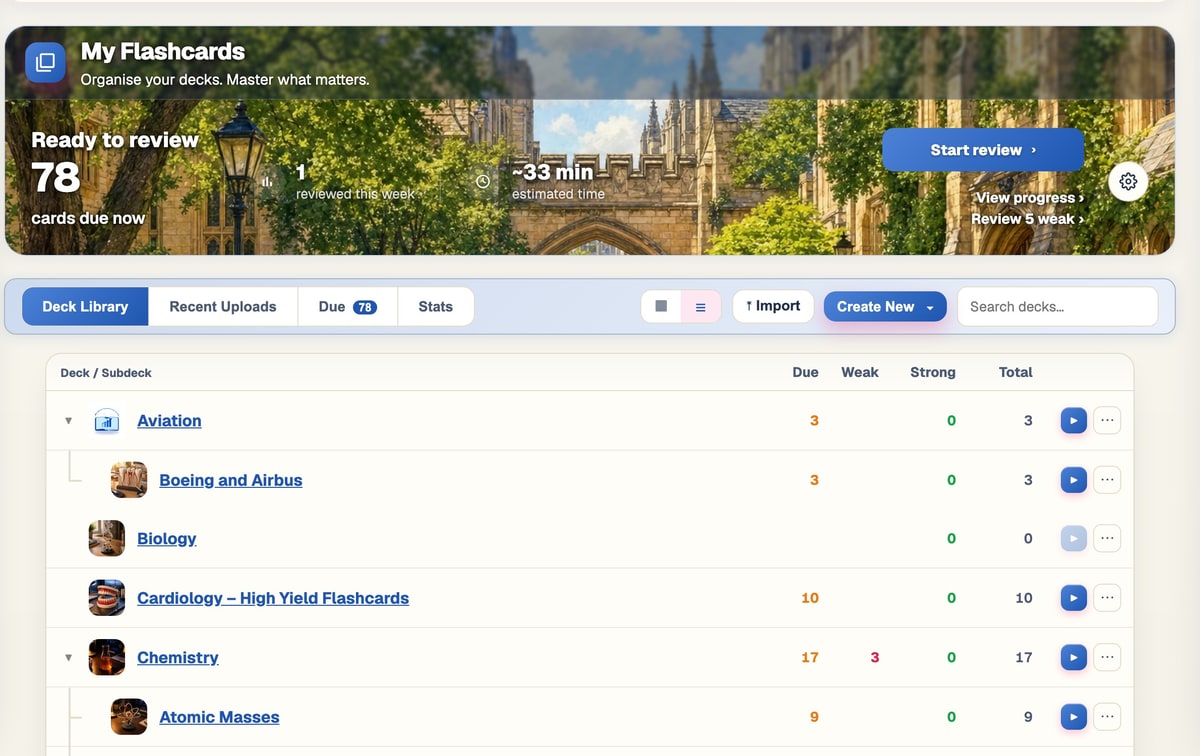
Add cards in seconds
Write a quick set by hand, with AI to complete the back, add an explanation or suggest a hint.

Every card, your way
A two-panel editor to rewrite, tag, bulk-edit or colour-code any card.
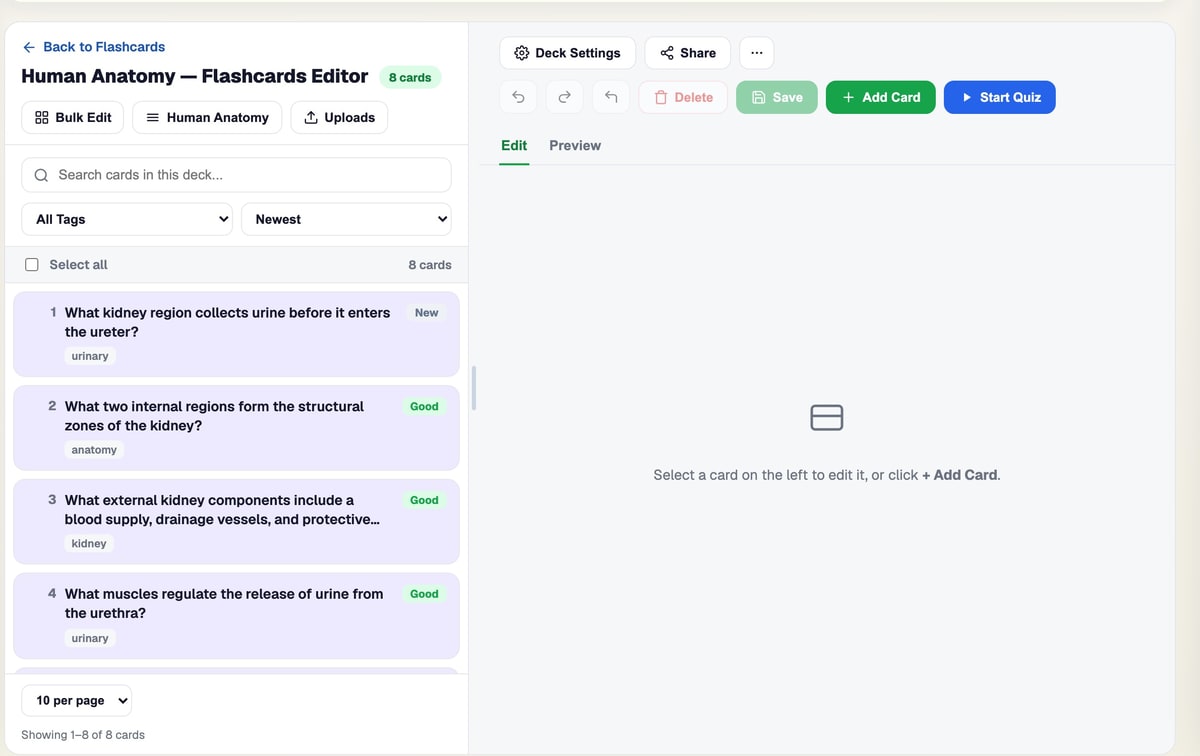
Browse the flashcard bank
Add ready-made, BrightStudy-curated sets straight into your decks.

From your notes to a deck you can study
Most decks are ready a couple of minutes after you upload.
- 1
Upload your notes
Slides, PDFs, handwritten pages, recordings or a YouTube lecture.
- 2
Tick flashcards
Add cards to any upload, or make them later from a Study Doc or the deck editor.
- 3
Written and tagged
BrightStudy writes each card and tags it by topic, type and concept.
- 4
Study what is due
Reveal or type each answer, with help on hand if you need it.
- 5
Grade and review
Incorrect, Almost or Correct, then a session summary shows how it went.
Bring your decks, keep your progress
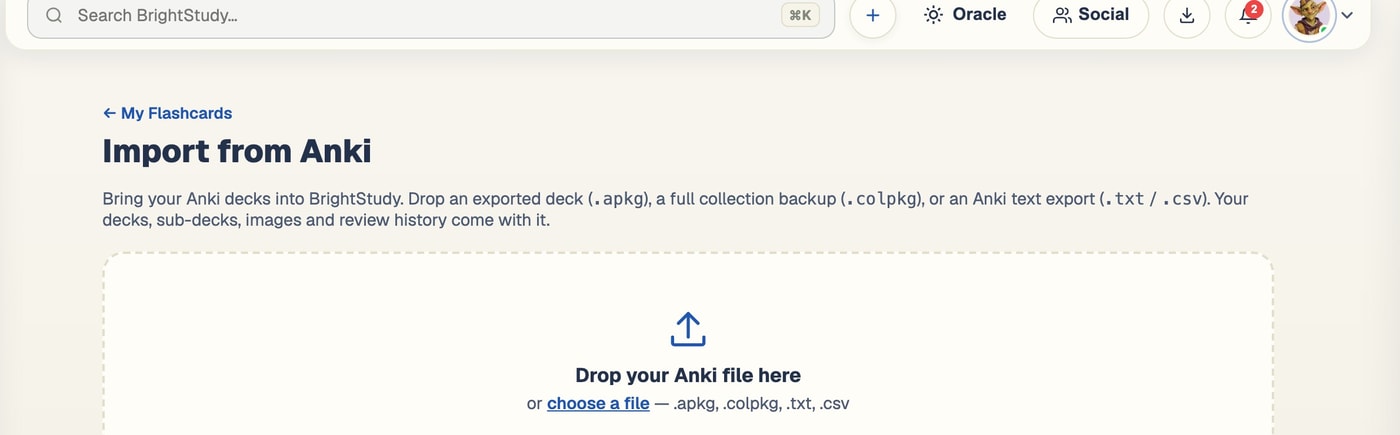
Import .apkg, .colpkg or a plain-text Anki export and BrightStudy rebuilds your deck hierarchy, keeps each card’s due date and progress, and brings images across too. Changed your mind? Undo removes the imported cards and any empty decks it created. See the full detail on spaced repetition.
Questions, answered
How BrightStudy writes, studies and organises your flashcards.
Try BrightStudy free and upload your first document, or email us at support@brightstudy.ai.
How does BrightStudy write my flashcards?
Can I study by typing instead of revealing the answer?
What do Incorrect, Almost and Correct do?
Can I get help when a card will not stick?
Can I organise my decks?
Can I edit cards after they are made?
Can I import my Anki decks?
Is making and studying flashcards free?
Explore the rest of BrightStudy
Move across the strips · tap one to explore
 MCQsExam-style questions with answer explanations.Learn more →
 Deep LearningExplain your understanding and get feedback.Learn more →
 AI TutorsAsk questions and explore difficult concepts.Learn more →
 AI ExplanationsHelp understanding answers and remembering ideas.Learn more →
 Spaced RepetitionRevisit your learning with scheduled reviews.Learn more →
 Study DocsStructured notes you can read, edit and study from.Learn more →
 Document UploadsPDFs, slides and typed or handwritten notes.Learn more →
Flashcards that know what you actually need to learn.
Turn your own notes into flashcards, tagged and explained, with help on hand whenever one will not stick.
- Free plan to get started
- Study Docs, flashcards and MCQs
- Runs in your browser